Updating Noctalia v4 to v5
This was mostly made for me to have a space to take note of what to change when doing the version bump for Noctalia on Linux. But putting it here in case it may help someone else as well!
My initial concern
I initially encountered this concern after I reported a bug in toggling Airplane mode in Noctalia, and saw that there was a bug with the switcher as it wasn’t visibly toggling ON, but a notification fired and said Airplane mode was on. What’s more, since then my Bluetooth settings got disabled and I couldn’t toggle it ON and OFF anymore unlike what I could do with my WiFi connection (which at the time I was troubleshooting, hence why I went in and interacted with the Airplane Mode).
From here, I first reached out to people in the CachyOS Discord server as I thought this could be something they could help with. I also eventually that it could also have been a Noctalia issue, so I also opened a support ticket in Noctalia’s Discord server.
Someone in the CachyOS Discord server was helpful enough to give me some commands I could take note of in the future if I wanted to troubleshoot these things:
rfkill list- see a list of all wireless devices on your devicerfkill unblock all- Unblock all wireless devices- I saw from the previous command that Bluetooth was set to
Soft blocked: oninitially and it wouldn’t switch to off even when I clicked the toggle. After doing this command, it was set to off and now I could toggle it ON and OFF again!
- I saw from the previous command that Bluetooth was set to
Noctalia has a new version
At this point the person from CachyOS was also asking me about my Noctalia setup, and they got me to check my version. Initially I was confused why they were telling me to “just install noctalia” only, when I thought I had that already set up, but eventually after a reply from Noctalia’s Discord server, I did confirm there’s an update in the Noctalia wiki docs for v4 to v5, and that noctalia is now just its own package; no more noctalia-qs and noctalia-shell stuff :))
Installing the Noctalia v5 one was easy, as it’s just one pacman command away, and wouldn’t normally constitute a post from me. But from here on out is me documenting switching from v4 to v5 😆 I was looking for some more docs in Noctalia about it but it kinda assumes one knows what to do 😅
So for someone like me that needs some extra guidance with stuff like this, I’ll just note it down as I continue :))
Compositor updates
My compositor or Window Manager is niri, and I know the config for the keybinds are set up differently for the old Noctalia shell. Taking a peek at the Niri compositor settings for Noctalia, I saw the formatting of the command is slightly different in v5.
The Noctalia support mod gave their own config.kdl to me for help, and I’ve updated my own personal config.kdl to match.
Collapsing the full copy-pastable code here for reference but hiding it behind a collapsible section so it doesn’t eat up the rest of the space haha
// Initial startup
spawn-sh-at-startup "/usr/lib/polkit-kde-authentication-agent-1 &" // Polkit -- more info: https://niri-wm.github.io/niri/Important-Software.html#authentication-agent
spawn-at-startup "noctalia" // Start up Noctalia v5 shell
prefer-no-csd // Disable program decorations
screenshot-path null

// Startup programs
spawn-sh-at-startup "zen-browser"
spawn-at-startup "discord"
spawn-at-startup "telegram"

// Input method daemon (fcitx5)
// This is for typing with the Japanese keyboard
spawn-sh-at-startup "fcitx5"

// Applies blur effect to all possible windows
window-rule {
  background-effect {
    blur true
    xray false
  }
}

layer-rule {
  match namespace="^noctalia-(bar-[^\"]+|notification|dock|panel|attached-panel|osd)$"
  background-effect {
    xray false
    // blur false
  }
}

input {
  keyboard {
    repeat-rate 40
    repeat-delay 300

    xkb {
      layout "us"
      variant "altgr-intl" // for typing ñ with the special combos
    }
  }

  mouse {
    accel-speed 0.2
    accel-profile "flat"
  }

  touchpad {
    tap
    // accel-speed 0.3 ??
    natural-scroll // Enable natural (macOS style) scrolling
    click-method "clickfinger"
    accel-profile "adaptive"
  }

  focus-follows-mouse max-scroll-amount="0%" // Automatically focus windows under mouse pointer
  workspace-auto-back-and-forth // Enable workspace back & forth switching
}

//  -------------- Animations --------------
animations {
  window-open {
    duration-ms 250
    curve "ease-out-quad"
  }
  workspace-switch {
    // duration-ms 250
    spring damping-ratio=1.0 stiffness=1000 epsilon=0.0001
  }
  window-close {
    duration-ms 250
    curve "ease-out-cubic"
  }
  horizontal-view-movement {
    spring damping-ratio=1.0 stiffness=900 epsilon=0.0001
  }
  window-movement {
    spring damping-ratio=1.0 stiffness=800 epsilon=0.0001
  }
  window-resize {
    spring damping-ratio=1.0 stiffness=1000 epsilon=0.0001
  }
  config-notification-open-close {
    spring damping-ratio=0.6 stiffness=1200 epsilon=0.001
  }
  screenshot-ui-open {
    duration-ms 300
    curve "ease-out-quad"
  }
  overview-open-close {
    spring damping-ratio=1.0 stiffness=900 epsilon=0.0001
  }
}

//  -------------- General Layout --------------
layout {
  gaps 8 // Gap between windows
  center-focused-column "on-overflow"

  focus-ring {
    on
    width 3
    active-color "#00ac89"
    inactive-color "#505050"
  }

  preset-column-widths {
    proportion 0.33333
    proportion 0.5
    proportion 0.66667
    fixed 1920
  }

  default-column-width {
    proportion 0.5
  }

  shadow {
    softness 30
    spread 5
    offset x=0 y=5
    color "#0007"
  }

  struts {}
}

//  -------------- Monitor configs --------------
// last updated 6 Oct 2026

// new monitor - Gigabyte
output "DP-3" {
  mode "3840x2160@160.000" // Set resolution and refresh rate
  scale 2.0 // No scaling (use 2 for HiDPI)
  position x=1920 y=0
  variable-refresh-rate // on-demand=true
  focus-at-startup
}

// Asus monitor
output "HDMI-A-1" {
  mode "1920x1080@60.000"
  scale 1
  position x=0 y=0
  // focus-at-startup
}

// Blur wallpaper
layer-rule {
  match namespace="^noctalia-backdrop"
  place-within-backdrop true
}

// -------------- Named Workspaces --------------
// last updated 30 Nov 2025

workspace "zen" {
  open-on-output "HDMI-A-1"
}

workspace "design" {
  open-on-output "HDMI-A-1"
}

workspace "chat" {
  open-on-output "DP-3"

  layout {
    center-focused-column "on-overflow"

    default-column-width {
      proportion 0.5
    }
  }
}

workspace "code" {
  open-on-output "DP-3"

  layout {
    default-column-width {
      proportion 0.5
    }
  }
}

workspace "games" {
  open-on-output "DP-3"

  layout {
    center-focused-column "always"
  }
}

// For ObCHIdian vault
workspace "vault" {
  open-on-output "DP-3"
}

// For focus work
workspace "focus" {
  open-on-output "DP-3"
}

// -------------- Specific Window rules --------------
window-rule {
  geometry-corner-radius 20
  clip-to-geometry true
}

// Noctalia specific
debug {
  // Allows notification actions and window activation from Noctalia.
  honor-xdg-activation-with-invalid-serial
}

window-rule {
  match app-id=r#"firefox$"# title="^Picture-in-Picture$"
  open-floating true // Always float Firefox PiP windows
}

window-rule {
  match app-id="zen" title="^Picture-in-Picture$"
  open-floating true // Always float zen-browser PiP windows
}

window-rule {
  match app-id="zen"

  exclude title="^Picture-in-Picture$"

  open-on-workspace "zen"
  open-maximized true
  default-floating-position x=0 y=0 relative-to="top-left"
}

window-rule {
  match app-id=r#"^dev\.zed\.Zed$"#
  open-on-workspace "code"
}

window-rule {
  match app-id="ghostty"
  open-on-workspace "code"

  background-effect {
    blur true
  }
}

window-rule {
  match app-id=r#"^one\.alynx\.showmethekey"# title="Floating Window - Show Me The Key"
  default-floating-position x=476 y=20 relative-to="bottom-left"
  open-floating true
  default-column-width { fixed 948; }
  default-window-height { fixed 92; }

  background-effect {
    blur true
  }
}

// Discord - main
window-rule {
  match app-id="discord"
  open-on-workspace "chat"
  // default-floating-position x=0 y=0 relative-to="top-left"
}

// For Vesktop to function the same as Discord
window-rule {
  match app-id="vesktop"
  open-on-workspace "chat"
  // default-floating-position x=0 y=0 relative-to="top-left"
}

window-rule {
  match app-id=r#"^org\.telegram\.desktop$"#
  open-on-workspace "chat"
  // default-floating-position x=960 y=0 relative-to="top-left"
}

window-rule {
  match app-id="Localsend"
  open-on-workspace "zen"
  open-floating true
}

window-rule {
  match app-id="Element"
  open-on-workspace "chat"
}

window-rule {
  match app-id=r#"^org\.squidowl\.halloy$"#
  default-column-width { proportion 0.4; }
  open-on-workspace "chat"
}

window-rule {
  match app-id="steam" title="Steam"
  open-on-workspace "games"
  open-fullscreen true
  open-floating false
}

// For Steam notifications
window-rule {
  match app-id="steam" title=r#"^notificationtoasts_\d+_desktop$"#
  default-floating-position x=10 y=10 relative-to="bottom-right"
}

// For Steam Special Offers popup
window-rule {
  match app-id="steam" title=r#"^Special Offers$"#
  open-floating true
  open-focused true
}

// For Steam Settings
window-rule {
  match app-id="steam"
  exclude title="Steam"
  open-on-workspace "games"
  open-floating true
}

// for games
window-rule {
  match app-id="gamescope"
  open-on-workspace "games"
  open-fullscreen true
}

// For FFXIV
window-rule {
  match app-id="ffxiv_dx11.exe" title="FINAL FANTASY XIV"
  open-on-workspace "games"
  open-fullscreen true
}

// This is for Figma only
window-rule {
  match app-id="google-chrome"
  open-on-workspace "design"
  open-maximized true
}

window-rule {
  match app-id="figma-linux-next"
  open-on-workspace "design"
  open-maximized true
}

// For working on my blog
window-rule {
  match app-id=r#"^dev\.zed\.Zed$"# title="chi-11ty"
  match app-id=r#"^dev\.zed\.Zed$"# title="chi-astro"
  open-on-workspace "code"
  open-maximized true
}

// When File Explorer opens
window-rule {
  match app-id=r#"^org\.gnome\.Nautilus$"# app-id=r#"^org\.kde\.dolphin$"#
  open-floating true
  default-window-height { proportion 0.7; }
}

// Spotify window Rules
window-rule {
  match app-id="spotify"
  open-maximized true
}

// For Spotify Miniplayer
// Targeting chromium-browser for now for it
window-rule {
  match app-id="chromium-browser"
  open-floating true
  default-floating-position x=10 y=10 relative-to="bottom-right"
  default-column-width { fixed 272; }
  default-window-height { fixed 170; }
}

// for personal vault
window-rule {
  match app-id="obsidian" title="ObCHIdian"
  open-on-workspace "vault"
  open-maximized true
}

// for chi-11ty
window-rule {
  match app-id="obsidian" title="chi-11ty"
  open-on-workspace "code"
  default-column-width { proportion 0.5; }
}

// for chi-astro
window-rule {
  match app-id="obsidian" title="chi-astro"
  open-on-workspace "code"
  default-column-width { proportion 0.5; }
}

// For VLC stuff
window-rule {
  match app-id="vlc" title="Convert"
  match app-id="vlc" title="Save file"
  open-floating true
}

// For Feed Reader
window-rule {
  match app-id=r#"^net\.sourceforge\.liferea$"#
  open-on-workspace "zen"
  default-column-width { proportion 0.7; }
}

// For Video Editor - kdenlive
window-rule {
  match app-id="kdenlive"
  open-on-workspace "focus"
  open-maximized true
}

//  -------------- Environment Variables --------------
environment {
  DISPLAY ":1"
  QT_QPA_PLATFORM "wayland"
  QT_QPA_PLATFORMTHEME "qt6ct"
  ELECTRON_OZONE_PLATFORM_HINT "auto"
  GTK_USE_PORTAL "1"
  QT_WAYLAND_DISABLE_WINDOWDECORATION "1"

  XDG_SESSION_TYPE "wayland"
  XDG_CURRENT_DESKTOP "niri"
}

//  -------------- Cursor --------------
cursor {
  // Gold Ship Umamusume cursor
  // xcursor-theme "gold-ship-cursors"
  // xcursor-size 24

  // Luigi cursors
  xcursor-theme "luigi-cursors"
  xcursor-size 48

  hide-when-typing
}

hotkey-overlay {
    skip-at-startup
    hide-not-bound
}

//  -------------- Key Bindings --------------
binds {
  MOD+SHIFT+ESCAPE                    { show-hotkey-overlay; }

  // ─── Applications ───
  MOD+RETURN                          hotkey-overlay-title="Open Terminal: ghostty" { spawn "ghostty"; }
  MOD+SPACE                           hotkey-overlay-title="Open App Launcher: Noctalia Launcher" { spawn-sh "noctalia msg panel-toggle launcher"; }
  MOD+B                               hotkey-overlay-title="Open Browser: zen-browser" { spawn "zen-browser"; }
  MOD+ALT+L                           hotkey-overlay-title="Lock Screen: Noctalia" { spawn-sh "noctalia msg session lock"; }

  MOD+E                               hotkey-overlay-title="File Manager: Dolphin" { spawn-sh "dolphin --platformtheme gtk3"; }

  // Core Noctalia binds
  Mod+S                               hotkey-overlay-title="Show Noctalia Control Center" { spawn-sh "noctalia msg panel-toggle control-center"; }
  Mod+Comma                           hotkey-overlay-title="Show Noctalia Settings" { spawn-sh "noctalia msg settings-toggle"; }

  // Brightness controls
  XF86MonBrightnessUp                 { spawn-sh "noctalia msg brightness-up"; }
  XF86MonBrightnessDown               { spawn-sh "noctalia msg brightness-down"; }

  // Utility shortcuts
  Mod+V                               hotkey-overlay-title="Show clipboard" { spawn-sh "noctalia msg panel-toggle clipboard"; }

  // Emojis
  Mod+Period                          hotkey-overlay-title="Show emoji picker" { spawn-sh "noctalia msg panel-toggle launcher /emo"; }

  // ─── Audio Controls ───
  // Example volume keys mappings for PipeWire & WirePlumber.
  // The allow-when-locked=true property makes them work even when the session is locked.
  // XF86AudioRaiseVolume                allow-when-locked=true { spawn-sh "wpctl set-volume @DEFAULT_AUDIO_SINK@ 0.1+"; }
  XF86AudioRaiseVolume                allow-when-locked=true { spawn-sh "noctalia msg volume-up"; }
  // XF86AudioLowerVolume                allow-when-locked=true { spawn-sh "wpctl set-volume @DEFAULT_AUDIO_SINK@ 0.1-"; }
  XF86AudioLowerVolume                allow-when-locked=true { spawn-sh "noctalia msg volume-down"; }
  // XF86AudioMute                       allow-when-locked=true { spawn-sh "wpctl set-mute @DEFAULT_AUDIO_SINK@ toggle"; }
  XF86AudioMute                       allow-when-locked=true { spawn-sh "noctalia msg volume-mute"; }
  // XF86AudioMicMute                    allow-when-locked=true { spawn-sh "wpctl set-mute @DEFAULT_AUDIO_SOURCE@ toggle"; }
  XF86AudioMicMute                    allow-when-locked=true { spawn-sh "noctalia msg mic-mute"; }
  // XF86AudioNext                       allow-when-locked=true { spawn-sh "playerctl next"; }
  XF86AudioNext                       allow-when-locked=true { spawn-sh "noctalia msg media next"; }
  // XF86AudioPause                      allow-when-locked=true { spawn-sh "playerctl play-pause"; }
  XF86AudioPause                      allow-when-locked=true { spawn-sh "noctalia msg media toggle"; }
  // XF86AudioPlay                       allow-when-locked=true { spawn-sh "playerctl play-pause"; }
  XF86AudioPlay                       allow-when-locked=true { spawn-sh "noctalia msg media play"; }
  // XF86AudioPrev                       allow-when-locked=true { spawn-sh "playerctl previous"; }
  XF86AudioPrev                       allow-when-locked=true { spawn-sh "noctalia msg media previous"; }

  // ─── Window Movement and Focus ───
  MOD+Q                               { close-window; }

  MOD+LEFT                            { focus-column-left; }
  MOD+H                               { focus-column-left; }
  MOD+RIGHT                           { focus-column-right; }
  MOD+L                               { focus-column-right; }
  MOD+UP                              { focus-window-up; }
  MOD+K                               { focus-window-up; }
  MOD+DOWN                            { focus-window-down; }
  MOD+J                               { focus-window-down; }

  MOD+CTRL+LEFT                       { move-column-left; }
  MOD+CTRL+H                          { move-column-left; }
  MOD+CTRL+RIGHT                      { move-column-right; }
  MOD+CTRL+L                          { move-column-right; }
  MOD+CTRL+UP                         { move-window-up; }
  MOD+CTRL+K                          { move-window-up; }
  MOD+CTRL+DOWN                       { move-window-down; }
  MOD+CTRL+J                          { move-window-down; }

  MOD+HOME                            { focus-column-first; }
  MOD+END                             { focus-column-last; }
  MOD+CTRL+HOME                       { move-column-to-first; }
  MOD+CTRL+END                        { move-column-to-last; }

  MOD+SHIFT+LEFT                      { focus-monitor-left; }
  MOD+SHIFT+RIGHT                     { focus-monitor-right; }
  MOD+SHIFT+UP                        { focus-monitor-up; }
  MOD+SHIFT+DOWN                      { focus-monitor-down; }

  MOD+SHIFT+CTRL+LEFT                 { move-column-to-monitor-left; }
  MOD+SHIFT+CTRL+RIGHT                { move-column-to-monitor-right; }
  MOD+SHIFT+CTRL+UP                   { move-column-to-monitor-up; }
  MOD+SHIFT+CTRL+DOWN                 { move-column-to-monitor-down; }

  // ─── Workspace Switching ───
  MOD+WHEELSCROLLDOWN                 cooldown-ms=150 { focus-workspace-down; }
  MOD+WHEELSCROLLUP                   cooldown-ms=150 { focus-workspace-up; }
  MOD+CTRL+WHEELSCROLLDOWN            cooldown-ms=150 { move-column-to-workspace-down; }
  MOD+CTRL+WHEELSCROLLUP              cooldown-ms=150 { move-column-to-workspace-up; }

  MOD+WHEELSCROLLRIGHT                { focus-column-right; }
  MOD+WHEELSCROLLLEFT                 { focus-column-left; }
  MOD+CTRL+WHEELSCROLLRIGHT           { move-column-right; }
  MOD+CTRL+WHEELSCROLLLEFT            { move-column-left; }

  MOD+SHIFT+WHEELSCROLLDOWN           { focus-column-right; }
  MOD+SHIFT+WHEELSCROLLUP             { focus-column-left; }
  MOD+CTRL+SHIFT+WHEELSCROLLDOWN      { move-column-right; }
  MOD+CTRL+SHIFT+WHEELSCROLLUP        { move-column-left; }

  MOD+1                               { focus-workspace 1; }
  MOD+2                               { focus-workspace 2; }
  MOD+3                               { focus-workspace 3; }
  MOD+4                               { focus-workspace 4; }
  MOD+5                               { focus-workspace 5; }
  MOD+6                               { focus-workspace 6; }
  MOD+7                               { focus-workspace 7; }
  MOD+8                               { focus-workspace 8; }
  MOD+9                               { focus-workspace 9; }

  MOD+CTRL+1                          { move-column-to-workspace 1; }
  MOD+CTRL+2                          { move-column-to-workspace 2; }
  MOD+CTRL+3                          { move-column-to-workspace 3; }
  MOD+CTRL+4                          { move-column-to-workspace 4; }
  MOD+CTRL+5                          { move-column-to-workspace 5; }
  MOD+CTRL+6                          { move-column-to-workspace 6; }
  MOD+CTRL+7                          { move-column-to-workspace 7; }
  MOD+CTRL+8                          { move-column-to-workspace 8; }
  MOD+CTRL+9                          { move-column-to-workspace 9; }

  MOD+TAB                             { focus-workspace-previous; }

  // ─── Layout Controls ───
  MOD+CTRL+F                          { expand-column-to-available-width; }
  MOD+C                               { center-column; }
  MOD+CTRL+C                          { center-visible-columns; }
  MOD+MINUS                           hotkey-overlay-title="-10% column width" { set-column-width "-10%"; }
  MOD+EQUAL                           hotkey-overlay-title="+10% column width" { set-column-width "+10%"; }
  MOD+SHIFT+MINUS                     hotkey-overlay-title="-10% column height" { set-window-height "-10%"; }
  MOD+SHIFT+EQUAL                     hotkey-overlay-title="+10% column height" { set-window-height "+10%"; }

  MOD+R                               { switch-preset-column-width; }

  // ─── Modes ───
  MOD+T                               { toggle-window-floating; }
  MOD+F                               { fullscreen-window; }
  MOD+W                               { toggle-column-tabbed-display; }

  // --- Tabbed Display stuff ---
  MOD+BracketLeft                     { consume-or-expel-window-left; }
  MOD+BracketRight                    { consume-or-expel-window-right; }

  // ─── Screenshots ───
  // based on Niri keybinds: https://niri-wm.github.io/niri/Configuration%3A-Key-Bindings.html#screenshot-screenshot-screen-screenshot-window
  CTRL+SHIFT+1                        { screenshot; }
  CTRL+SHIFT+2                        { screenshot-screen; }
  CTRL+SHIFT+3                        { screenshot-window; }

  // ─── Emergency Escape Key ───
  // Use this when a fullscreen app blocks your keybinds.
  // It disables any active keyboard shortcut inhibitor, restoring control.
  MOD+ESCAPE                          allow-inhibiting=false { toggle-keyboard-shortcuts-inhibit; }

  // ─── Exit / Power ───
  CTRL+ALT+DELETE                     { quit; } // Also quits Niri
  MOD+SHIFT+P                         { power-off-monitors; } // Turn off screens (useful for OLED or privacy)
  MOD+O                               repeat=false { toggle-overview; }
}

include "noctalia.kdl"
Also including here the diff between my old and new config just for additional reference hehe
// Initial startup
spawn-sh-at-startup "/usr/lib/polkit-kde-authentication-agent-1 &" // Polkit -- more info: https://niri-wm.github.io/niri/Important-Software.html#authentication-agent
-spawn-at-startup "qs" "-c" "noctalia-shell"
-spawn-sh-at-startup "swww-daemon" // Wallpaper daemon
-spawn-sh-at-startup "swww img /home/chi/Pictures/Wallpapers/wallhaven_k7yjd1.jpg" // Set wallpaper
+spawn-at-startup "noctalia" // Start up Noctalia v5 shell
prefer-no-csd // Disable program decorations
screenshot-path null

-// Setup my default apps
-spawn-sh-at-startup "qs -c noctalia-shell ipc call darkMode setDark" // Dark mode

// Startup programs
spawn-sh-at-startup "zen-browser"
spawn-at-startup "discord"
spawn-at-startup "telegram"

// Input method daemon (fcitx5)
// This is for typing with the Japanese keyboard
spawn-sh-at-startup "fcitx5"

// Applies blur effect to all possible windows
window-rule {
  background-effect {
    blur true
    xray false
  }
}

layer-rule {
  match namespace="^noctalia-(bar-[^\"]+|notification|dock|panel|attached-panel|osd)$"
  background-effect {
    xray false
    // blur false
  }
}

input {
  keyboard {
+   repeat-rate 40
+   repeat-delay 300
+
    xkb {
      layout "us"
      variant "altgr-intl" // for typing ñ with the special combos
    }
-   numlock
  }

  mouse {
    accel-speed 0.2
    accel-profile "flat"
  }

  touchpad {
    tap
    natural-scroll // Enable natural (macOS style) scrolling
    click-method "clickfinger"
    accel-profile "adaptive"
  }

  focus-follows-mouse max-scroll-amount="0%" // Automatically focus windows under mouse pointer
  workspace-auto-back-and-forth // Enable workspace back & forth switching
}

//  -------------- Animations --------------
animations {
  window-open {
-   duration-ms 200
+   duration-ms 250
    curve "ease-out-quad"
  }
  workspace-switch {
    spring damping-ratio=1.0 stiffness=1000 epsilon=0.0001
  }
  window-close {
-   duration-ms 200
+   duration-ms 250
    curve "ease-out-cubic"
  }
  horizontal-view-movement {
    spring damping-ratio=1.0 stiffness=900 epsilon=0.0001
  }
  window-movement {
    spring damping-ratio=1.0 stiffness=800 epsilon=0.0001
  }
  window-resize {
    spring damping-ratio=1.0 stiffness=1000 epsilon=0.0001
  }
  config-notification-open-close {
    spring damping-ratio=0.6 stiffness=1200 epsilon=0.001
  }
  screenshot-ui-open {
    duration-ms 300
    curve "ease-out-quad"
  }
  overview-open-close {
    spring damping-ratio=1.0 stiffness=900 epsilon=0.0001
  }
}

//  -------------- General Layout --------------
layout {
  gaps 8 // Gap between windows
  center-focused-column "on-overflow"

  focus-ring {
+   on
    width 3
    active-color "#00ac89"
    inactive-color "#505050"
  }

  preset-column-widths {
    proportion 0.33333
    proportion 0.5
    proportion 0.66667
    fixed 1920
  }

  default-column-width {
    proportion 0.5
  }

  shadow {
    softness 30
    spread 5
    offset x=0 y=5
    color "#0007"
  }

  struts {}
}

//  -------------- Monitor configs --------------
// last updated 6 Oct 2026

// new monitor - Gigabyte
output "DP-3" {
  mode "3840x2160@160.000" // Set resolution and refresh rate
  scale 2.0 // No scaling (use 2 for HiDPI)
  position x=1920 y=0
  variable-refresh-rate // on-demand=true
  focus-at-startup
}

// Asus monitor
output "HDMI-A-1" {
  mode "1920x1080@60.000"
  scale 1
  position x=0 y=0
  // focus-at-startup
}

// Blur wallpaper
layer-rule {
- match namespace="^noctalia-overview*"
+ match namespace="^noctalia-backdrop"
  place-within-backdrop true
}

// -------------- Named Workspaces --------------
// last updated 30 Nov 2025

workspace "zen" {
  open-on-output "HDMI-A-1"
}

workspace "design" {
  open-on-output "HDMI-A-1"
}

workspace "chat" {
  open-on-output "DP-3"

  layout {
    center-focused-column "on-overflow"

    default-column-width {
      proportion 0.5
    }
  }
}

workspace "code" {
  open-on-output "DP-3"

  layout {
    default-column-width {
      proportion 0.5
    }
  }
}

workspace "games" {
  open-on-output "DP-3"

  layout {
    center-focused-column "always"
  }
}

// For ObCHIdian vault
workspace "vault" {
  open-on-output "DP-3"
}

// For focus work
workspace "focus" {
  open-on-output "DP-3"
}

// -------------- Specific Window rules --------------
window-rule {
  geometry-corner-radius 20
  clip-to-geometry true
}

// Noctalia specific
debug {
  // Allows notification actions and window activation from Noctalia.
  honor-xdg-activation-with-invalid-serial
}

window-rule {
  match app-id=r#"firefox$"# title="^Picture-in-Picture$"
  open-floating true // Always float Firefox PiP windows
}

window-rule {
  match app-id="zen" title="^Picture-in-Picture$"
  open-floating true // Always float zen-browser PiP windows
}

window-rule {
  match app-id="zen"

  exclude title="^Picture-in-Picture$"

  open-on-workspace "zen"
  open-maximized true
  default-floating-position x=0 y=0 relative-to="top-left"
}

window-rule {
  match app-id=r#"^dev\.zed\.Zed$"#
  open-on-workspace "code"
}

window-rule {
  match app-id="ghostty"
  open-on-workspace "code"

  background-effect {
    blur true
  }
}

window-rule {
  match app-id=r#"^one\.alynx\.showmethekey"# title="Floating Window - Show Me The Key"
  default-floating-position x=476 y=20 relative-to="bottom-left"
  open-floating true
  default-column-width { fixed 948; }
  default-window-height { fixed 92; }

  background-effect {
    blur true
  }
}

// Discord - main
window-rule {
  match app-id="discord"
  open-on-workspace "chat"
  // default-floating-position x=0 y=0 relative-to="top-left"
}

// For Vesktop to function the same as Discord
window-rule {
  match app-id="vesktop"
  open-on-workspace "chat"
  // default-floating-position x=0 y=0 relative-to="top-left"
}

window-rule {
  match app-id=r#"^org\.telegram\.desktop$"#
  open-on-workspace "chat"
  // default-floating-position x=960 y=0 relative-to="top-left"
}

window-rule {
  match app-id="Localsend"
  open-on-workspace "zen"
  open-floating true
}

window-rule {
  match app-id="Element"
  open-on-workspace "chat"
}

window-rule {
  match app-id=r#"^org\.squidowl\.halloy$"#
  default-column-width { proportion 0.4; }
  open-on-workspace "chat"
}

window-rule {
  match app-id="steam" title="Steam"
  open-on-workspace "games"
  open-fullscreen true
  open-floating false
}

// For Steam notifications
window-rule {
  match app-id="steam" title=r#"^notificationtoasts_\d+_desktop$"#
  default-floating-position x=10 y=10 relative-to="bottom-right"
}

// For Steam Special Offers popup
window-rule {
  match app-id="steam" title=r#"^Special Offers$"#
  open-floating true
  open-focused true
}

// For Steam Settings
window-rule {
  match app-id="steam"
  exclude title="Steam"
  open-on-workspace "games"
  open-floating true
}

// for games
window-rule {
  match app-id="gamescope"
  open-on-workspace "games"
  open-fullscreen true
}

// For FFXIV
window-rule {
  match app-id="ffxiv_dx11.exe" title="FINAL FANTASY XIV"
  open-on-workspace "games"
  open-fullscreen true
}

// This is for Figma only
window-rule {
  match app-id="google-chrome"
  open-on-workspace "design"
  open-maximized true
}

window-rule {
  match app-id="figma-linux-next"
  open-on-workspace "design"
  open-maximized true
}

// For working on my blog
window-rule {
  match app-id=r#"^dev\.zed\.Zed$"# title="chi-11ty"
  match app-id=r#"^dev\.zed\.Zed$"# title="chi-astro"
  open-on-workspace "code"
  open-maximized true
}

// When File Explorer opens
window-rule {
  match app-id=r#"^org\.gnome\.Nautilus$"# app-id=r#"^org\.kde\.dolphin$"#
  open-floating true
  default-window-height { proportion 0.7; }
}

// Spotify window Rules
window-rule {
  match app-id="spotify"
  open-maximized true
}

// For Spotify Miniplayer
// Targeting chromium-browser for now for it
window-rule {
  match app-id="chromium-browser"
  open-floating true
  default-floating-position x=10 y=10 relative-to="bottom-right"
  default-column-width { fixed 272; }
  default-window-height { fixed 170; }
}

// for personal vault
window-rule {
  match app-id="obsidian" title="ObCHIdian"
  open-on-workspace "vault"
  open-maximized true
}

// for chi-11ty
window-rule {
  match app-id="obsidian" title="chi-11ty"
  open-on-workspace "code"
  default-column-width { proportion 0.5; }
}

// for chi-astro
window-rule {
  match app-id="obsidian" title="chi-astro"
  open-on-workspace "code"
  default-column-width { proportion 0.5; }
}

// For VLC stuff
window-rule {
  match app-id="vlc" title="Convert"
  match app-id="vlc" title="Save file"
  open-floating true
}

// For Feed Reader
window-rule {
  match app-id=r#"^net\.sourceforge\.liferea$"#
  open-on-workspace "zen"
  default-column-width { proportion 0.7; }
}

// For Video Editor - kdenlive
window-rule {
  match app-id="kdenlive"
  open-on-workspace "focus"
  open-maximized true
}

//  -------------- Environment Variables --------------
environment {
  DISPLAY ":1"
  QT_QPA_PLATFORM "wayland"
-  // QT_QPA_PLATFORMTHEME "gtk3"
-  QT_QPA_PLATFORMTHEME "qt5ct"
+  QT_QPA_PLATFORMTHEME "qt6ct"
  ELECTRON_OZONE_PLATFORM_HINT "auto"
+  GTK_USE_PORTAL "1"
  QT_WAYLAND_DISABLE_WINDOWDECORATION "1"

  XDG_SESSION_TYPE "wayland"
  XDG_CURRENT_DESKTOP "niri"
}

//  -------------- Cursor --------------
cursor {
  // Gold Ship Umamusume cursor
  // xcursor-theme "gold-ship-cursors"
  // xcursor-size 24

  // Luigi cursors
  xcursor-theme "luigi-cursors"
  xcursor-size 48

  hide-when-typing
}

hotkey-overlay {
    skip-at-startup
    hide-not-bound
}

//  -------------- Key Bindings --------------
binds {
  MOD+SHIFT+ESCAPE                    { show-hotkey-overlay; }

  // ─── Applications ───
  MOD+RETURN                          hotkey-overlay-title="Open Terminal: ghostty" { spawn "ghostty"; }
- MOD+SPACE                           hotkey-overlay-title="Open App Launcher: Noctalia Launcher" { spawn-sh "qs -c noctalia-shell ipc call launcher toggle"; }
+ MOD+SPACE                           hotkey-overlay-title="Open App Launcher: Noctalia Launcher" { spawn-sh "noctalia msg panel-toggle launcher"; }
  MOD+B                               hotkey-overlay-title="Open Browser: zen-browser" { spawn "zen-browser"; }
- MOD+ALT+L                           hotkey-overlay-title="Lock Screen: Noctalia" { spawn-sh "qs -c noctalia-shell ipc call lockScreen lock"; }
+ MOD+ALT+L                           hotkey-overlay-title="Lock Screen: Noctalia" { spawn-sh "noctalia msg session lock"; }

  MOD+E                               hotkey-overlay-title="File Manager: Dolphin" { spawn-sh "dolphin --platformtheme gtk3"; }

  // Core Noctalia binds
- Mod+S                               hotkey-overlay-title="Show Noctalia Control Center" { spawn "qs" "-c" "noctalia-shell" "ipc" "call" "controlCenter" "toggle"; }
+ Mod+S                               hotkey-overlay-title="Show Noctalia Control Center" { spawn-sh "noctalia msg panel-toggle control-center"; }
- Mod+Comma                           hotkey-overlay-title="Show Noctalia Settings" { spawn "qs" "-c" "noctalia-shell" "ipc" "call" "settings" "toggle"; }
+ Mod+Comma                           hotkey-overlay-title="Show Noctalia Settings" { spawn-sh "noctalia msg settings-toggle"; }

  // Brightness controls
- XF86MonBrightnessUp                 { spawn "qs" "-c" "noctalia-shell" "ipc" "call" "brightness" "increase"; }
+ XF86MonBrightnessUp                 { spawn-sh "noctalia msg brightness-up"; }
- XF86MonBrightnessDown               { spawn "qs" "-c" "noctalia-shell" "ipc" "call" "brightness" "decrease"; }
+ XF86MonBrightnessDown               { spawn-sh "noctalia msg brightness-down"; }

  // Utility shortcuts
- Mod+V                               hotkey-overlay-title="Show clipboard" { spawn "qs" "-c" "noctalia-shell" "ipc" "call" "launcher" "clipboard"; }
+ Mod+V                               hotkey-overlay-title="Show clipboard" { spawn-sh "noctalia msg panel-toggle clipboard"; }

  // Emojis
- MOD+Period                          hotkey-overlay-title="Show emoji picker" { spawn "qs" "-c" "noctalia-shell" "ipc" "call" "launcher" "emoji"; }
+ Mod+Period                          hotkey-overlay-title="Show emoji picker" { spawn-sh "noctalia msg panel-toggle launcher /emo"; }

  // ─── Audio Controls ───
  // Example volume keys mappings for PipeWire & WirePlumber.
  // The allow-when-locked=true property makes them work even when the session is locked.
- XF86AudioRaiseVolume                allow-when-locked=true { spawn-sh "wpctl set-volume @DEFAULT_AUDIO_SINK@ 0.1+"; }
+ XF86AudioRaiseVolume                allow-when-locked=true { spawn-sh "noctalia msg volume-up"; }
- XF86AudioLowerVolume                allow-when-locked=true { spawn-sh "wpctl set-volume @DEFAULT_AUDIO_SINK@ 0.1-"; }
+ XF86AudioLowerVolume                allow-when-locked=true { spawn-sh "noctalia msg volume-down"; }
- XF86AudioMute                       allow-when-locked=true { spawn-sh "wpctl set-mute @DEFAULT_AUDIO_SINK@ toggle"; }
+ XF86AudioMute                       allow-when-locked=true { spawn-sh "noctalia msg volume-mute"; }
- XF86AudioMicMute                    allow-when-locked=true { spawn-sh "wpctl set-mute @DEFAULT_AUDIO_SOURCE@ toggle"; }
+ XF86AudioMicMute                    allow-when-locked=true { spawn-sh "noctalia msg mic-mute"; }
- XF86AudioNext                       allow-when-locked=true { spawn-sh "playerctl next"; }
+ XF86AudioNext                       allow-when-locked=true { spawn-sh "noctalia msg media next"; }
- XF86AudioPause                      allow-when-locked=true { spawn-sh "playerctl play-pause"; }
+ XF86AudioPause                      allow-when-locked=true { spawn-sh "noctalia msg media toggle"; }
- XF86AudioPlay                       allow-when-locked=true { spawn-sh "playerctl play-pause"; }
+ XF86AudioPlay                       allow-when-locked=true { spawn-sh "noctalia msg media play"; }
- XF86AudioPrev                       allow-when-locked=true { spawn-sh "playerctl previous"; }
+ XF86AudioPrev                       allow-when-locked=true { spawn-sh "noctalia msg media previous"; }

  // ─── Window Movement and Focus ───
  MOD+Q                               { close-window; }

  MOD+LEFT                            { focus-column-left; }
  MOD+H                               { focus-column-left; }
  MOD+RIGHT                           { focus-column-right; }
  MOD+L                               { focus-column-right; }
  MOD+UP                              { focus-window-up; }
  MOD+K                               { focus-window-up; }
  MOD+DOWN                            { focus-window-down; }
  MOD+J                               { focus-window-down; }

  MOD+CTRL+LEFT                       { move-column-left; }
  MOD+CTRL+H                          { move-column-left; }
  MOD+CTRL+RIGHT                      { move-column-right; }
  MOD+CTRL+L                          { move-column-right; }
  MOD+CTRL+UP                         { move-window-up; }
  MOD+CTRL+K                          { move-window-up; }
  MOD+CTRL+DOWN                       { move-window-down; }
  MOD+CTRL+J                          { move-window-down; }

  MOD+HOME                            { focus-column-first; }
  MOD+END                             { focus-column-last; }
  MOD+CTRL+HOME                       { move-column-to-first; }
  MOD+CTRL+END                        { move-column-to-last; }

  MOD+SHIFT+LEFT                      { focus-monitor-left; }
  MOD+SHIFT+RIGHT                     { focus-monitor-right; }
  MOD+SHIFT+UP                        { focus-monitor-up; }
  MOD+SHIFT+DOWN                      { focus-monitor-down; }

  MOD+SHIFT+CTRL+LEFT                 { move-column-to-monitor-left; }
  MOD+SHIFT+CTRL+RIGHT                { move-column-to-monitor-right; }
  MOD+SHIFT+CTRL+UP                   { move-column-to-monitor-up; }
  MOD+SHIFT+CTRL+DOWN                 { move-column-to-monitor-down; }

  // ─── Workspace Switching ───
  MOD+WHEELSCROLLDOWN                 cooldown-ms=150 { focus-workspace-down; }
  MOD+WHEELSCROLLUP                   cooldown-ms=150 { focus-workspace-up; }
  MOD+CTRL+WHEELSCROLLDOWN            cooldown-ms=150 { move-column-to-workspace-down; }
  MOD+CTRL+WHEELSCROLLUP              cooldown-ms=150 { move-column-to-workspace-up; }

  MOD+WHEELSCROLLRIGHT                { focus-column-right; }
  MOD+WHEELSCROLLLEFT                 { focus-column-left; }
  MOD+CTRL+WHEELSCROLLRIGHT           { move-column-right; }
  MOD+CTRL+WHEELSCROLLLEFT            { move-column-left; }

  MOD+SHIFT+WHEELSCROLLDOWN           { focus-column-right; }
  MOD+SHIFT+WHEELSCROLLUP             { focus-column-left; }
  MOD+CTRL+SHIFT+WHEELSCROLLDOWN      { move-column-right; }
  MOD+CTRL+SHIFT+WHEELSCROLLUP        { move-column-left; }

  MOD+1                               { focus-workspace 1; }
  MOD+2                               { focus-workspace 2; }
  MOD+3                               { focus-workspace 3; }
  MOD+4                               { focus-workspace 4; }
  MOD+5                               { focus-workspace 5; }
  MOD+6                               { focus-workspace 6; }
  MOD+7                               { focus-workspace 7; }
  MOD+8                               { focus-workspace 8; }
  MOD+9                               { focus-workspace 9; }

  MOD+CTRL+1                          { move-column-to-workspace 1; }
  MOD+CTRL+2                          { move-column-to-workspace 2; }
  MOD+CTRL+3                          { move-column-to-workspace 3; }
  MOD+CTRL+4                          { move-column-to-workspace 4; }
  MOD+CTRL+5                          { move-column-to-workspace 5; }
  MOD+CTRL+6                          { move-column-to-workspace 6; }
  MOD+CTRL+7                          { move-column-to-workspace 7; }
  MOD+CTRL+8                          { move-column-to-workspace 8; }
  MOD+CTRL+9                          { move-column-to-workspace 9; }

  MOD+TAB                             { focus-workspace-previous; }

  // ─── Layout Controls ───
  MOD+CTRL+F                          { expand-column-to-available-width; }
  MOD+C                               { center-column; }
  MOD+CTRL+C                          { center-visible-columns; }
  MOD+MINUS                           hotkey-overlay-title="-10% column width" { set-column-width "-10%"; }
  MOD+EQUAL                           hotkey-overlay-title="+10% column width" { set-column-width "+10%"; }
  MOD+SHIFT+MINUS                     hotkey-overlay-title="-10% column height" { set-window-height "-10%"; }
  MOD+SHIFT+EQUAL                     hotkey-overlay-title="+10% column height" { set-window-height "+10%"; }

  MOD+R                               { switch-preset-column-width; }

  // ─── Modes ───
  MOD+T                               { toggle-window-floating; }
  MOD+F                               { fullscreen-window; }
  MOD+W                               { toggle-column-tabbed-display; }

  // --- Tabbed Display stuff ---
  MOD+BracketLeft                     { consume-or-expel-window-left; }
  MOD+BracketRight                    { consume-or-expel-window-right; }

  // ─── Screenshots ───
  // based on Niri keybinds: https://niri-wm.github.io/niri/Configuration%3A-Key-Bindings.html#screenshot-screenshot-screen-screenshot-window
  CTRL+SHIFT+1                        { screenshot; }
  CTRL+SHIFT+2                        { screenshot-screen; }
  CTRL+SHIFT+3                        { screenshot-window; }
- MOD+CTRL+S                          { spawn-sh "qs -c noctalia-shell ipc call screenRecorder toggle"; }

  // ─── Emergency Escape Key ───
  // Use this when a fullscreen app blocks your keybinds.
  // It disables any active keyboard shortcut inhibitor, restoring control.
  MOD+ESCAPE                          allow-inhibiting=false { toggle-keyboard-shortcuts-inhibit; }

  // ─── Exit / Power ───
  CTRL+ALT+DELETE                     { quit; } // Also quits Niri
  MOD+SHIFT+P                         { power-off-monitors; } // Turn off screens (useful for OLED or privacy)
  MOD+O                               repeat=false { toggle-overview; }
}

include "noctalia.kdl"
Now I’m in the new Noctalia, and it’s essentially a new shell that you’d need to set up again. It kinda helps to have the old config from Noctalia v4 exported and copied as a file to reference if you had any specific visual changes (like say, color hex codes used, and… mostly just that lmao) you’d wanna port over to Noctalia v5.
Getting a hang of v5
I particularly like the updated plugins list, there’s way more plugins now and that’s gonna be another rabbit hole I get into 😆 The plugins could even potentially be connected to keybinds, something I don’t think was still that fleshed out back in v4? But I might be wrong.
It also feels even more customizable, and that I think is saying something considering the previous version already felt like it was something you could theme to your liking. There were some things that were kinda hidden behind code configs or fiddling your way through some panels, but with this new v5 one, all the settings just surface the things you could tinker with. And I’m pretty sure there’s more to that, but I’m already pretty happy with what exists 😁
I did see there were some plugins for editing the cursors and such, but I have already set that up using the qt6ct config, and the cursors I have don’t really have any other sizing (aside from 24x24px 😅) and I have some attachment to them so I’ll keep it as-is for now.
Overall, the updated version feels more complete and thought through, compared to the previous version that was already good in its own right, but it did feel like it was built and put together along the way… if that makes sense? :)) I feel like there’s so many more things I could do with my desktop, and I’m really happy with the customizations I have so far. 😊
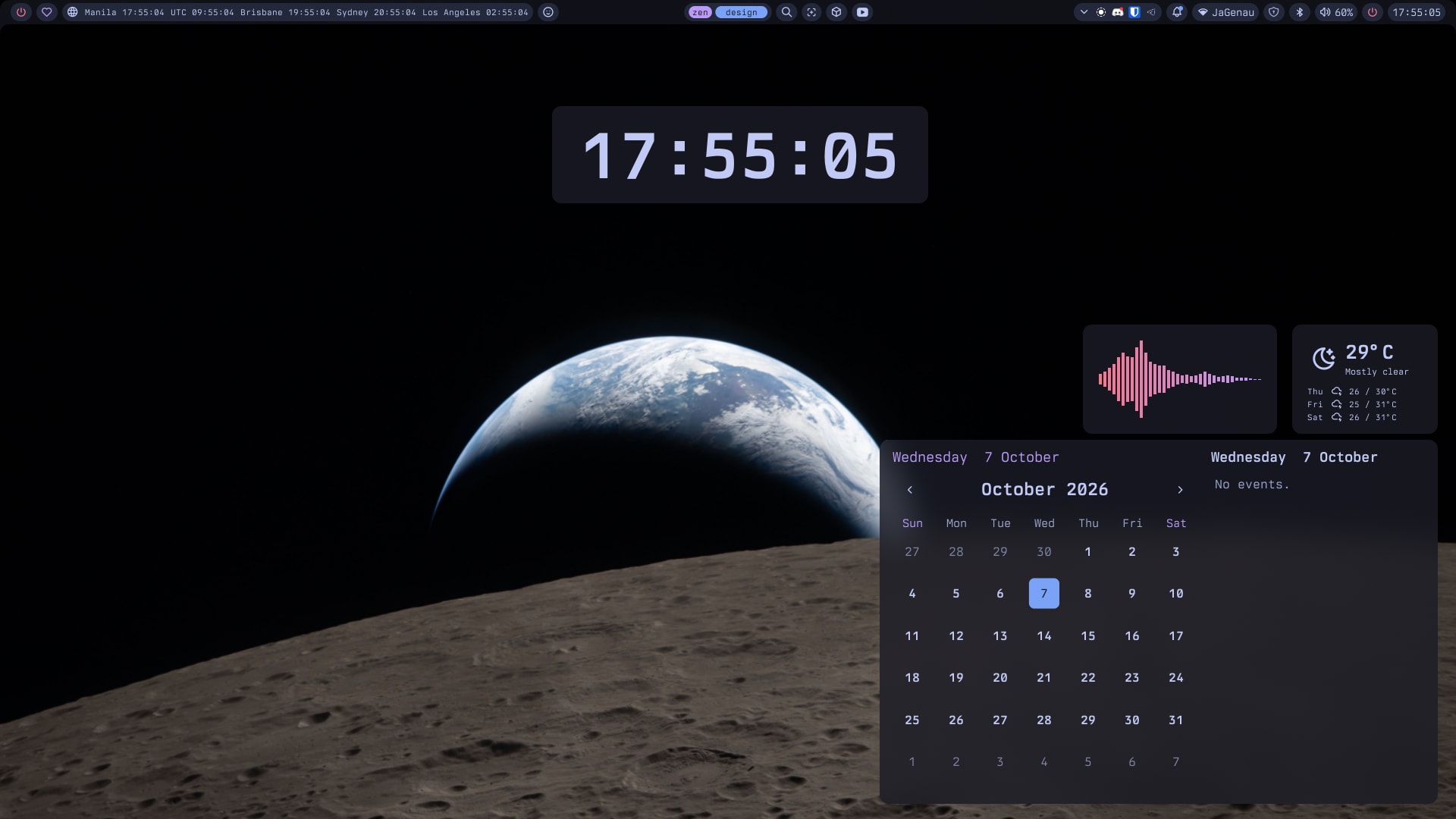
To end this random share, here’s my current desktop layout! I kept my old wallpaper—the “Earthset” photo from Artemis II!—and set up all the desktop widgets I used to have in v4 and rearranged them with the v5 way 😁